Sonador 0.4: Sonador Studylist, Collaboration, Authorization and Access Control
Published November 8, 2025 (updated August 24, 2026). We're excited to announce the release of Sonador 0.4, delivering powerful new capabilities to help medical imaging teams collaborate, review studies, and manage clinical workflows. This release introduces:
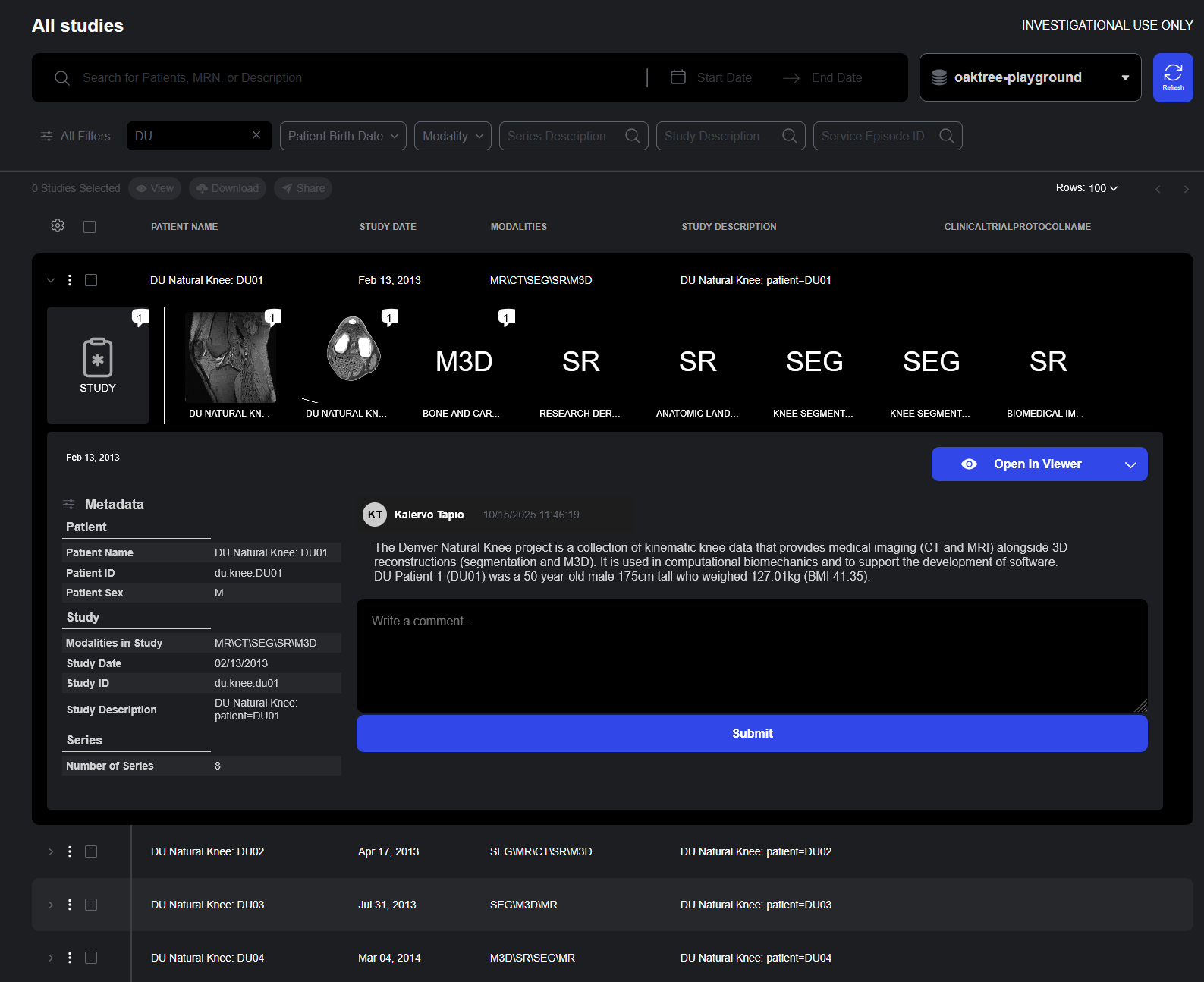
- A new study list providing advanced search tools and a Details Drawer, providing access to a quick view of the study, metadata, and comments.
- Worklist management and a rapid review tool to streamline assessment of data.
- Study/series comments, and enhanced data management tools that bring unprecedented efficiency to radiology and medical imaging workflows.
From improved data discovery to secure teamwork and comprehensive access control and authorization, Sonador 0.4 strengthens the foundation for connected healthcare. The features in this release are designed to enhance trust, accelerate insight, and make complex processes feel frictionless.
Note: This article introduces Sonador 0.4, the foundation release of the 0.4 series. Sonador 0.4.1 (released August 2026), builds on everything described here with advanced 3D imaging, review that continues offline, Data Services, and an Access Log.
Sonador Studylist: Everything You Need to See, In One Place
The new Sonador Studylist, built for speed and clarity, offers advanced query and filtering, instant study and series details, integrated collaboration and comments, worklist access to streamline review, and advanced sharing options. It reduces friction, accelerates review, and transforms complexity into flow.
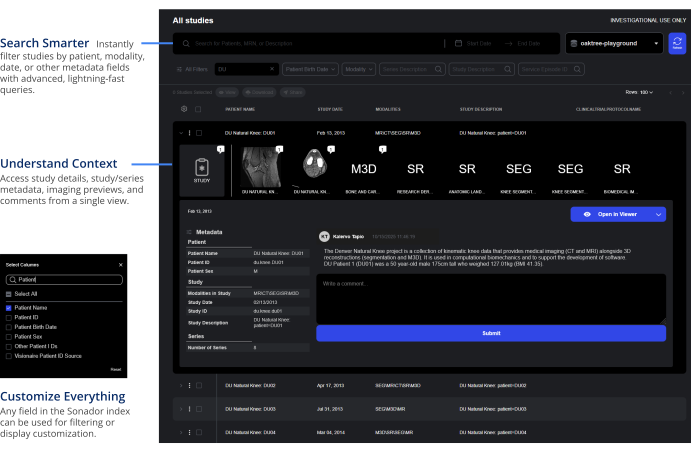
Advanced Query and Search
The Studylist interface consolidates powerful search, contextual detail, and review tools into a single, beautifully designed workspace that reduces friction and accelerates clinical workflows.
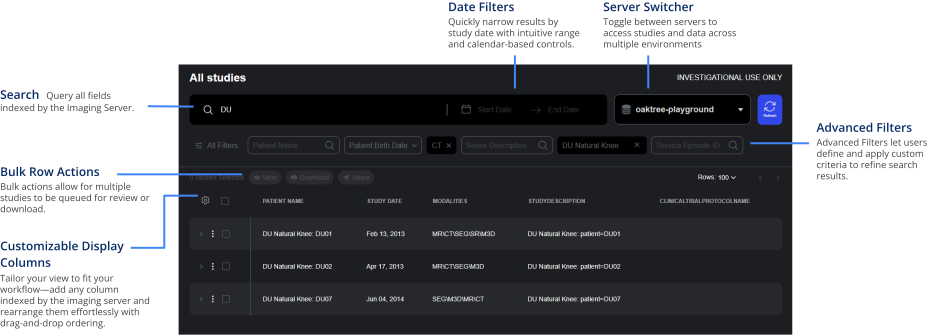
- Intelligent Search. Instantly filter studies by modality, patient metadata, study date, or other indexed fields using advanced, lightning-fast queries. Search results update in real-time as users type.
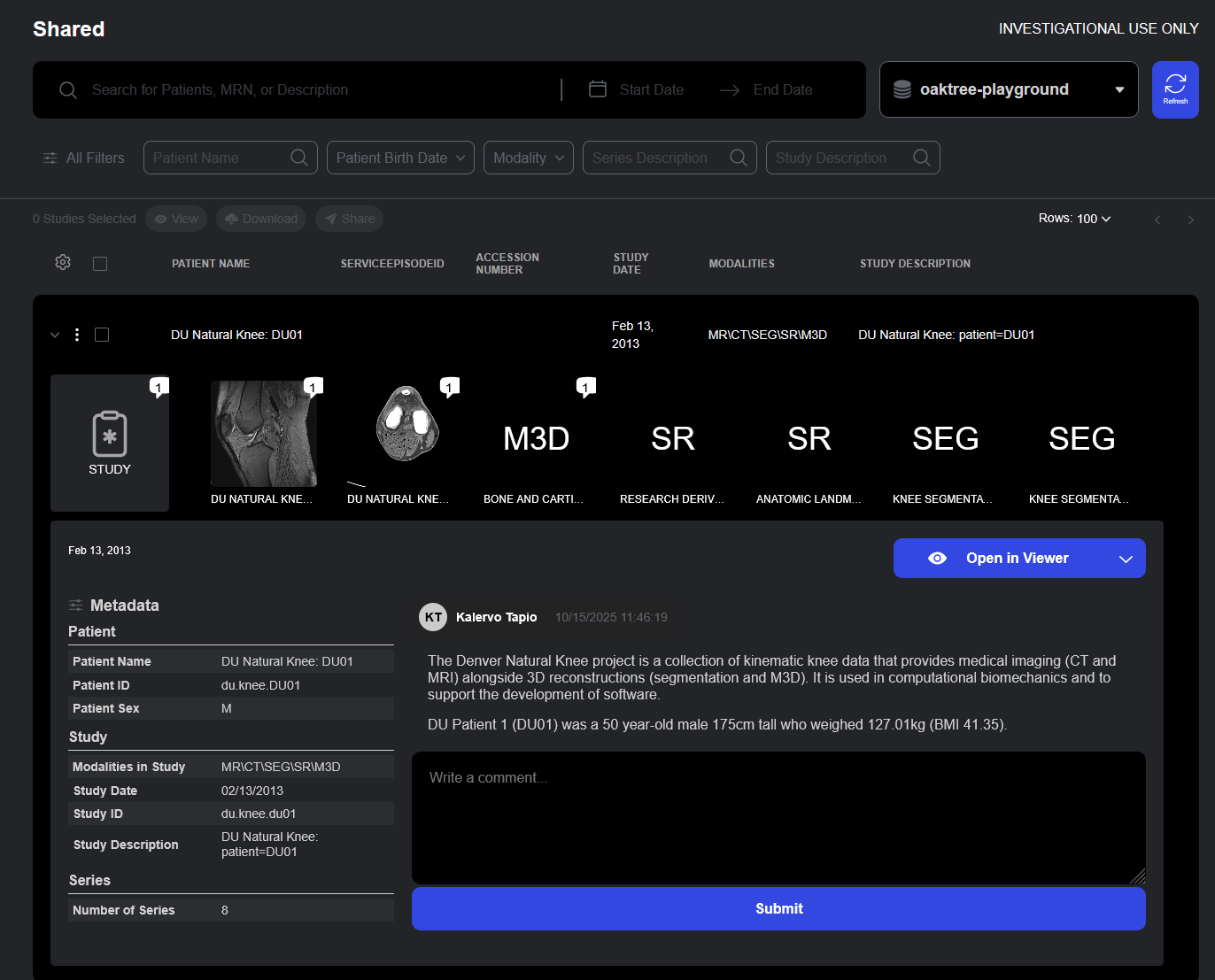
- Contextual Study Details: The Details Drawer provides access to complete study metadata, imaging previews, and comments without requiring users to leave the current view.
- Review Tools: Access to worklists and the Rapid Review Toolbar helps to streamline review and annotation workflows, while Series Tagging helps standardize review vocabularies and concepts.
- Bulk Actions: Bulk row actions allow for multiple studies to be queued for review, download, or sharing.
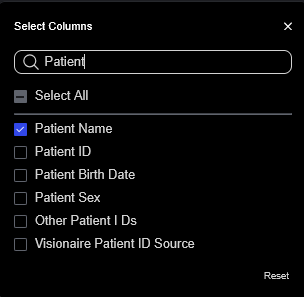
Indexed Field Access: Fields can be customized across the entire Sonador Platform (including the "All Studies" search and within the "Shared" "Worklists" panels). Any field in the Orthanc index can be used for filtering or display customization.
Study Details at a Glance
The Details Drawer provides quick access to complete study information including metadata, comments, and imaging previews in a single, easily accessible interface.
- At-a-Glance Metadata: Study details including patient demographics, study description, accession numbers, modalities, and acquisition parameters are displayed to provide context around the study and its related series.
- Series Previews: Thumbnails of all series within provide visual preview of study contents.
- Comment Integration: Study and series comments are displayed in the details drawer, ensuring that reviewer annotations and notes are visible without requiring that the viewer be opened.
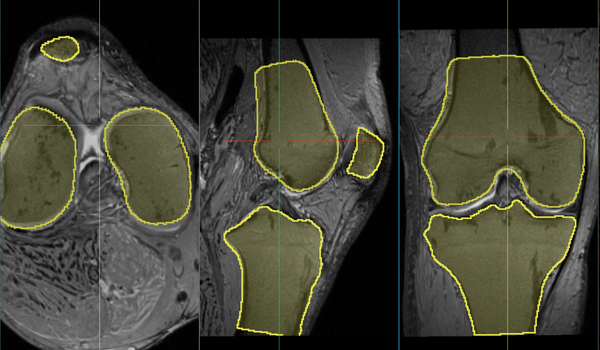
- Access to Advanced Viewers: From the details drawer, users can launch specialized viewers including the Sonador Viewer, OHIF Viewer Modes, or the Segmentation Editor for annotation workflows.
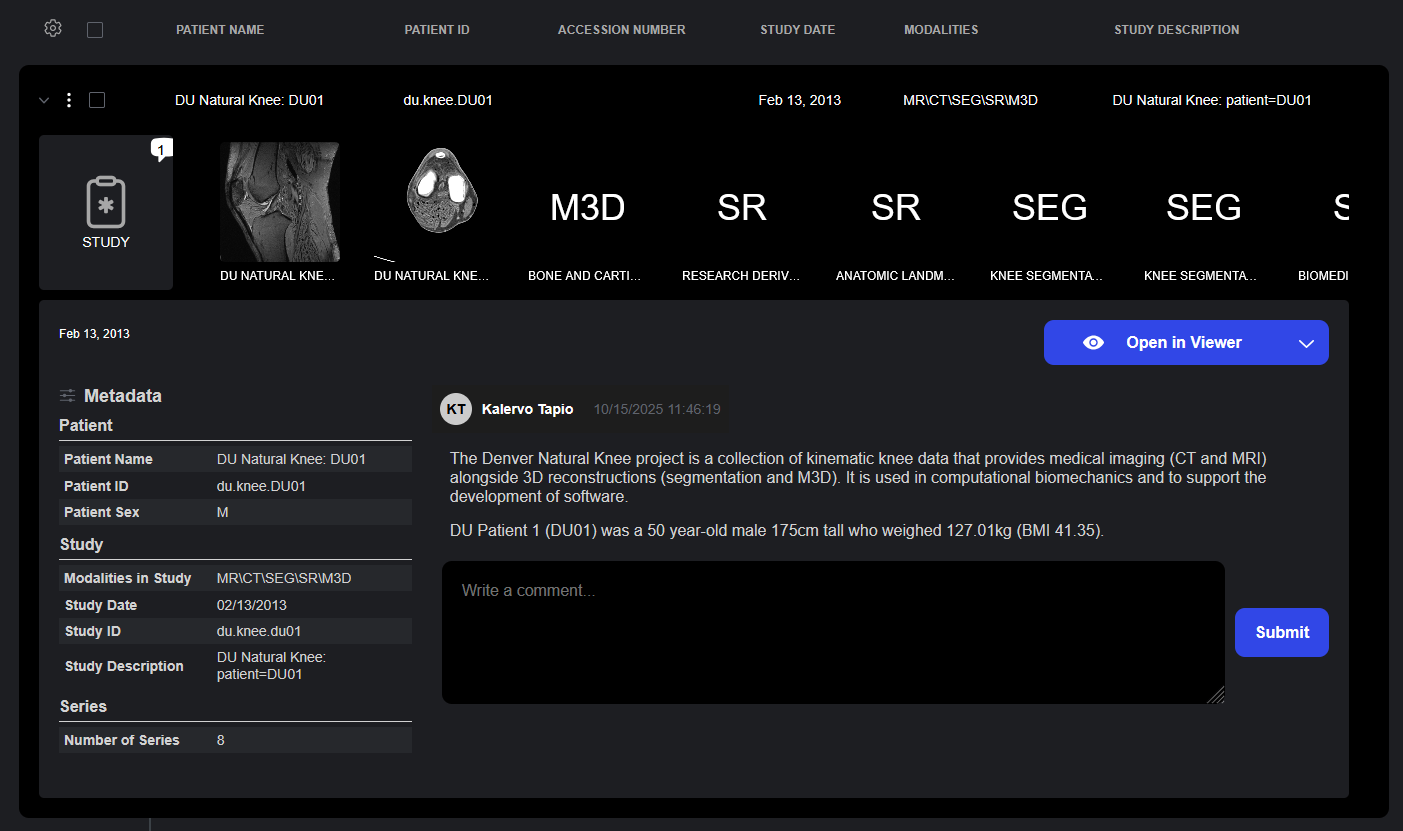
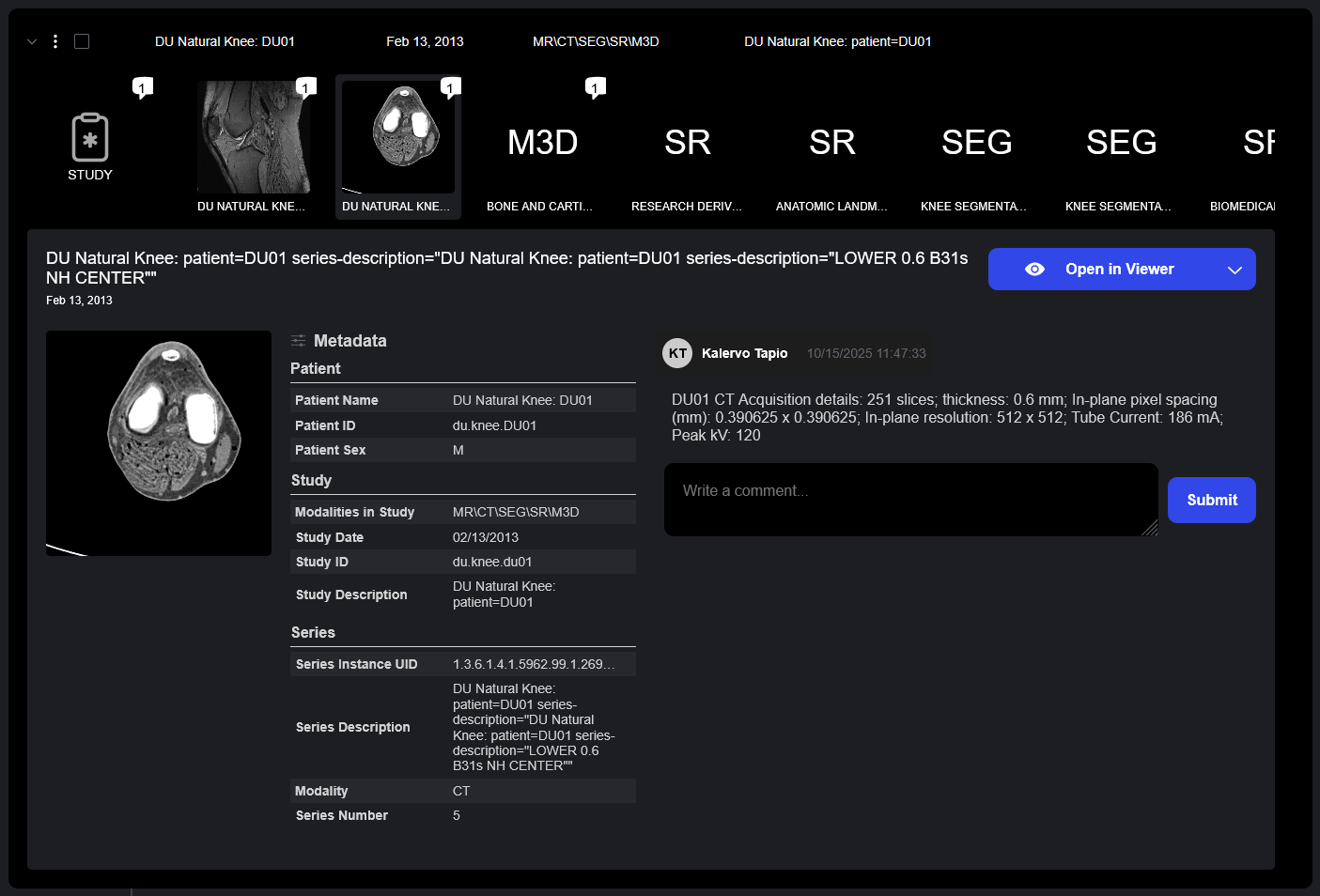
The Details Drawer provides access to study and series metadata, thumbnail previews, and comments. Comments capture the history behind each study in Sonador, adding context and detail beyond standard metadata.
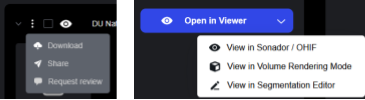
Links from the Details Drawer allow for the launch of studies within the Sonador Viewer or specialized OHIF Viewer Modes for imaging review.
Collaborate Securely. Work Smarter. Share with Confidence.
With Worklists to organize study review, a Rapid Review Toolbar to streamline annotation, and Series Tagging for structured classification; Sonador brings order and speed to collaborative review. Integrated Comments and Resource Sharing ensures that insights and permissions flow effortlessly across users keeping teams aligned, compliant, and in-sync.
Worklists
Organize studies and streamline user review.
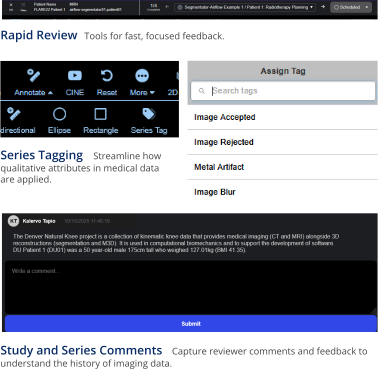
Rapid Review Toolbar
Tools for fast, focused feedback.
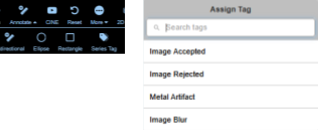
Series Tagging
Streamline how qualitative attributes in medical data are applied.

Study and Series Comments
Capture reviewer comments and feedback to understand the history of imaging data.
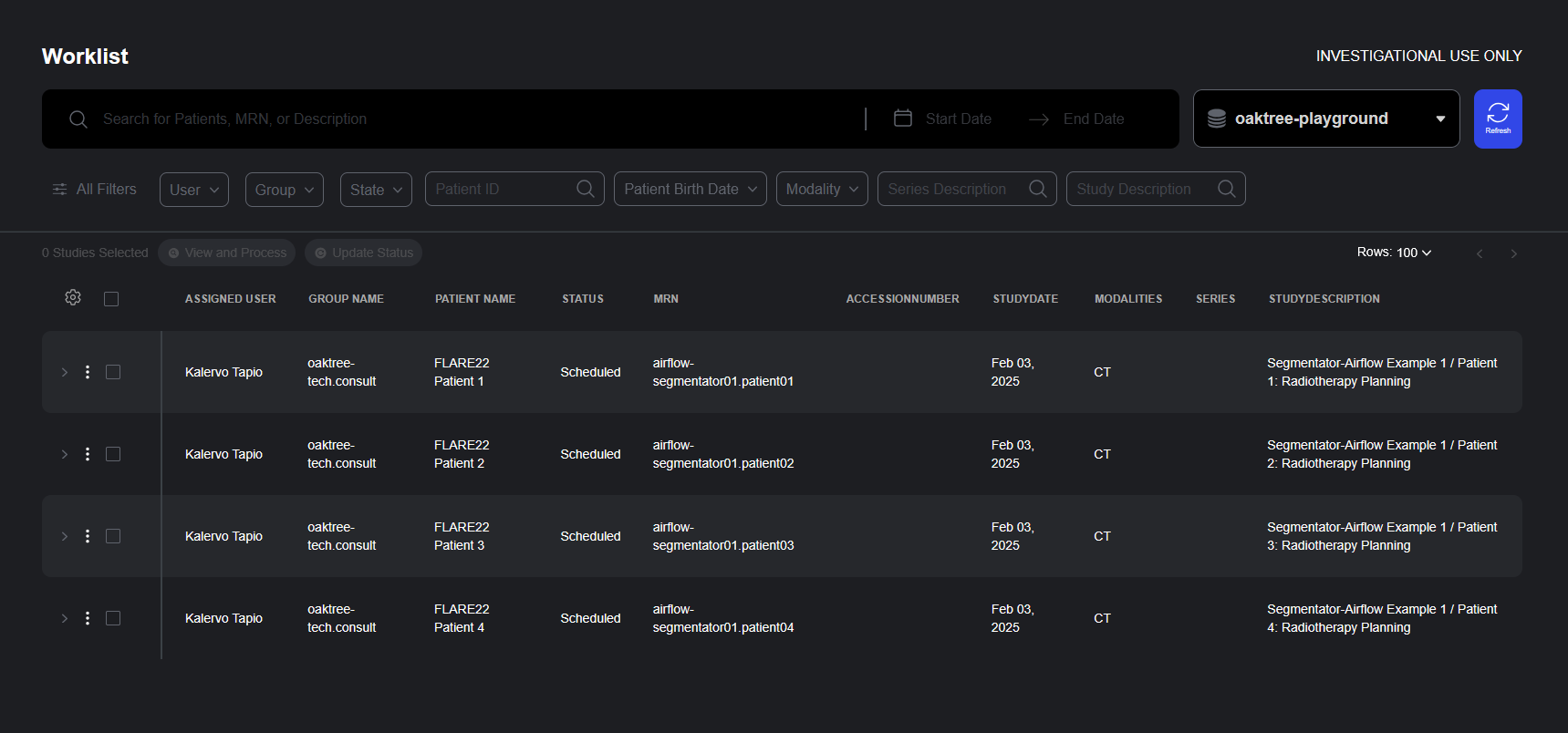
Worklists Streamline the Review of Medical Imaging Data
The new Worklist Panel brings structure and efficiency to medical imaging review by organizing studies into shared queues that can be assigned to individual users or groups. This collaborative workspace simplifies coordination across clinical teams and enables better progress tracking throughout the review lifecycle.
- Flexible Study Organization: Worklists organize studies into shared queues, allowing teams to segment work by priority, specialty, urgency, or any other clinical criteria.
- User and Group Assignment: Each work item in a list can be assigned to a specific user or group, enabling clear ownership and accountability. This feature makes it simple to route studies to the appropriate specialists or teams while maintaining visibility across the organization.
- Comprehensive Study View: The worklist interface displays essential metadata including assigned user, group name, patient name, status, modality, accession number, study date, and custom descriptors.
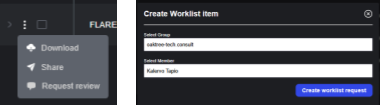
Studies can be added to a worklist from the study list by clicking on “Request Review” from the action menu.
Rapid Review Toolbar: Fast and Focused Feedback
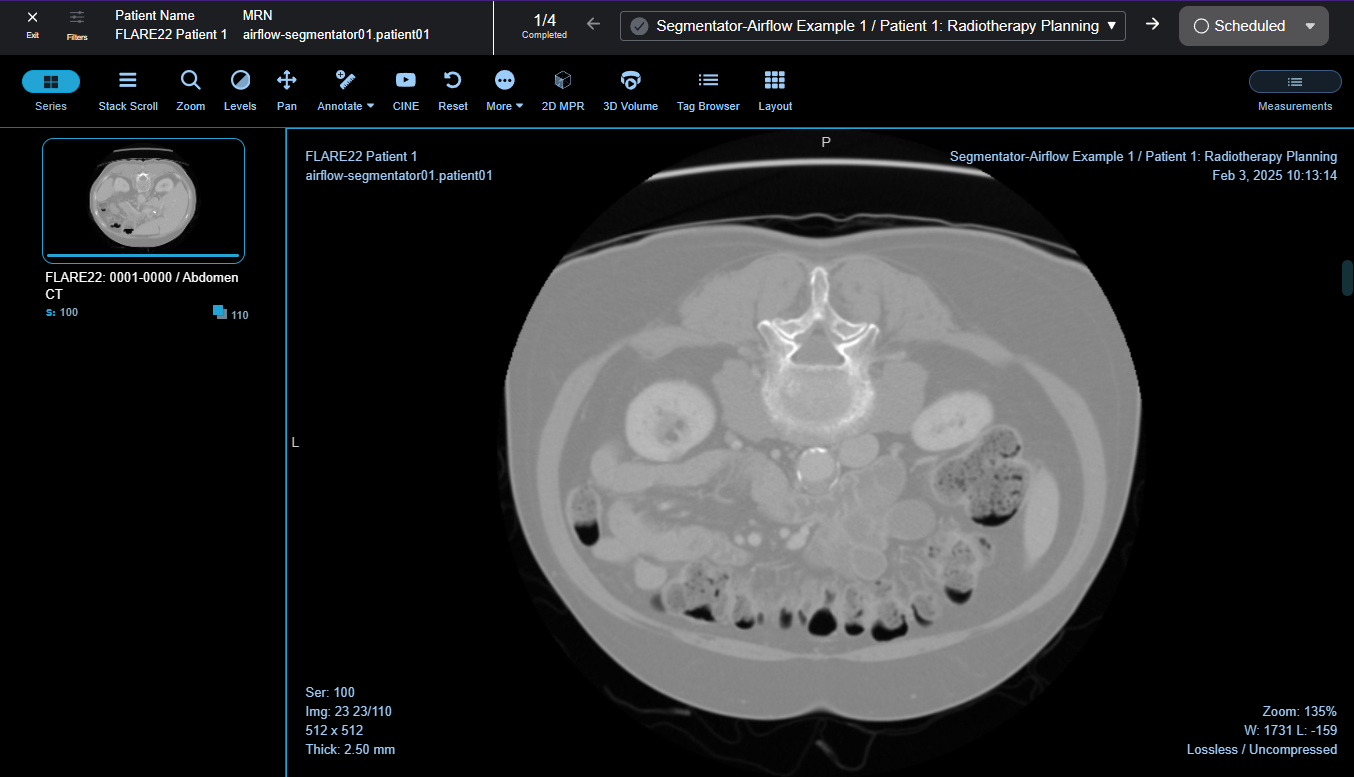
The Rapid Review Toolbar allows radiologists and clinicians to move through worklist studies without leaving the review interface. This streamlined approach eliminates navigation friction and enables reviewers to maintain focus on interpretation, assessment, and reporting.
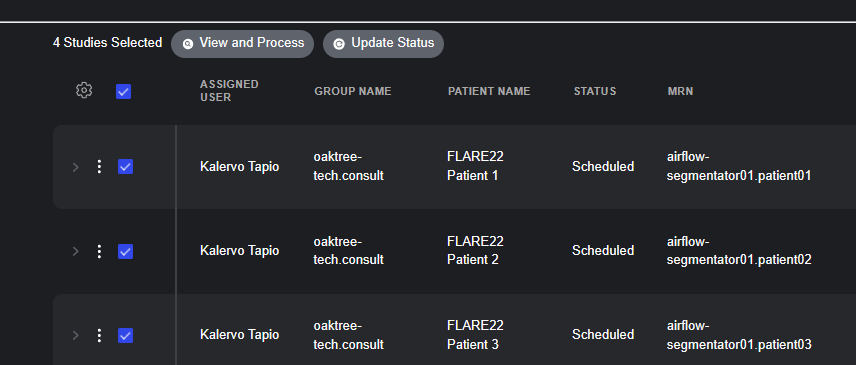
- Seamless Study Navigation: Studies are queued for processing by selecting them in the worklist panel and clicking "View and Process." Once in the viewer, reviewers navigate between queued studies with a single click using the toolbar.
- Inline Status Updates: The toolbar provides immediate status control with a dropdown menu offering options including Scheduled, In-progress, Completed, and Cancelled. Reviewers can update study status directly from the toolbar as they complete their review, ensuring real-time progress tracking.
- Context Preservation: When navigating between studies using the Rapid Review Toolbar, viewport configurations, window/level presets, and tool selections are preserved where appropriate, reducing repetitive setup tasks and accelerating review time.
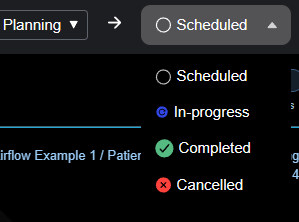
Studies are queued for processing by selecting them in the worklist panel and clicking "View and Process." Worklist status can be updated from the toolbar once review is complete.
Series Tags: Enrich and Accelerate Imaging Review
The new Series Tagging feature streamlines how qualitative attributes are applied to medical imaging data. Reviewers can assign predefined tags such as "Image Accepted," "Image Rejected," "Metal Artifact," or "Image Blur" directly within the viewer interface.
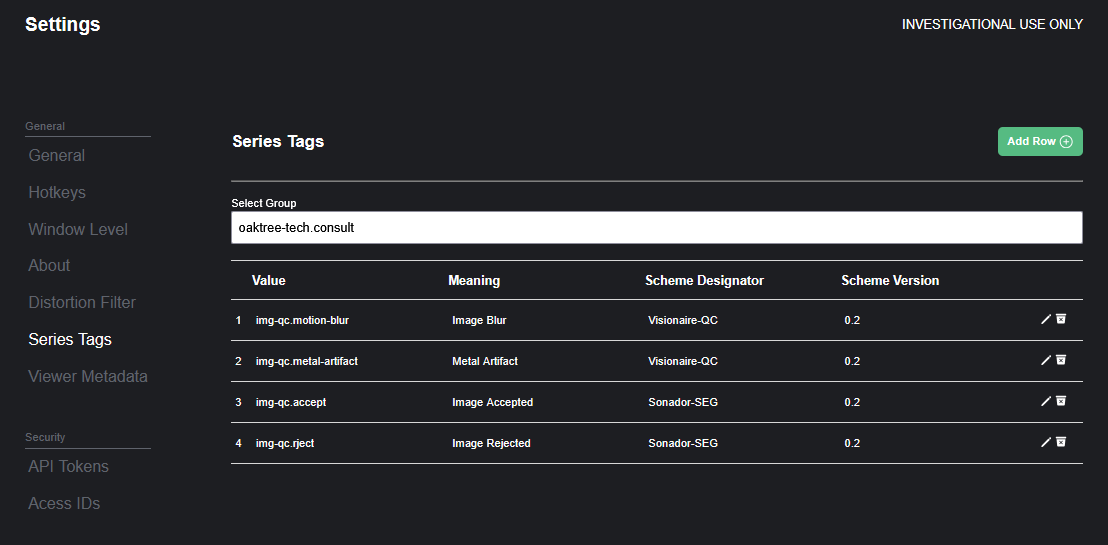
- Custom Tag Libraries: Organizations can define custom tag sets that align with their specific quality control protocols or research data. Tags are visible to all users with appropriate permissions.
- Qualitative Data Representation: Tags represent "Coded Concepts" and help facilitate clinical workflows or data annotation. A tag may represent a key step in a process or findings such as "Motion Blur" or "Metal Artifact."
- Rendered Within Viewer: Tags are applied from within the viewer and saved as DICOM-SR. They appear within the viewport as annotations and the sidebar as "Findings."

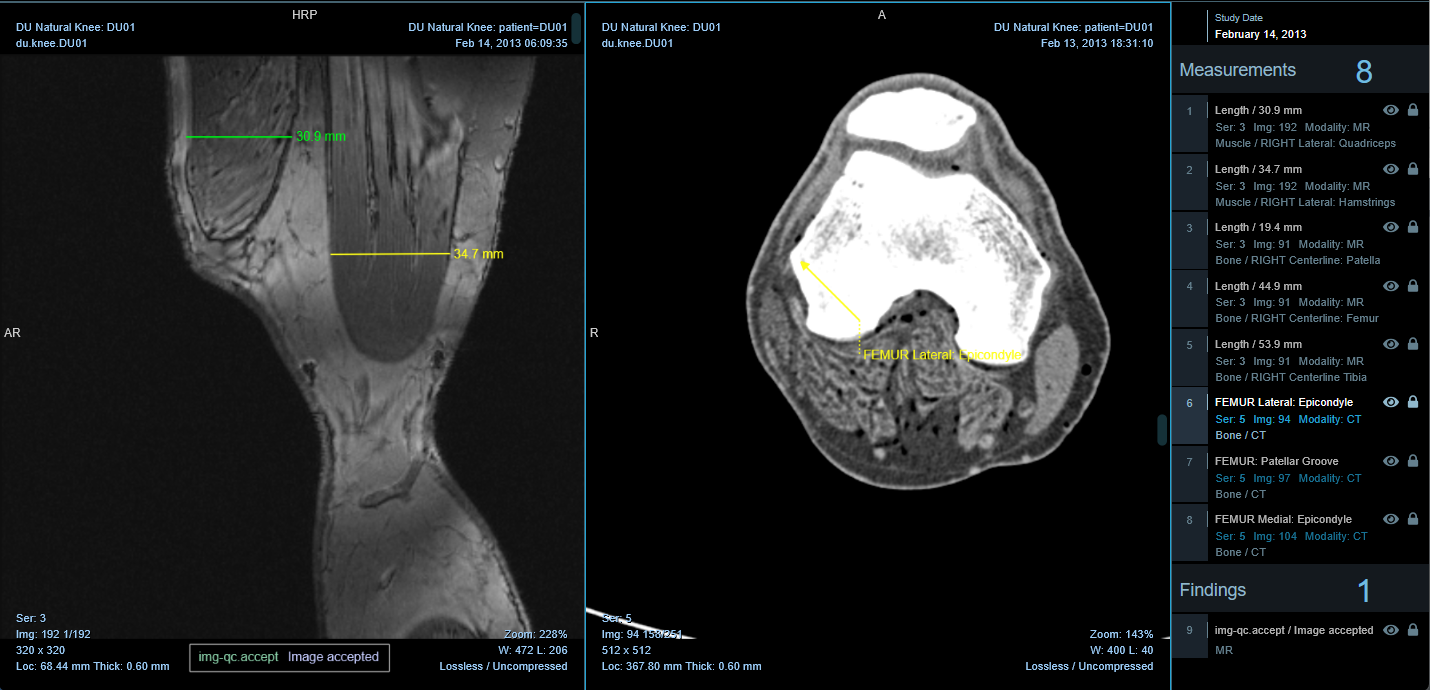
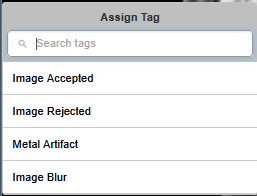
A Tag is defined within a group and encodes a "concept" such as "Image Accepted" or "Image Rejected."
Secure by Design. Seamless in Use.
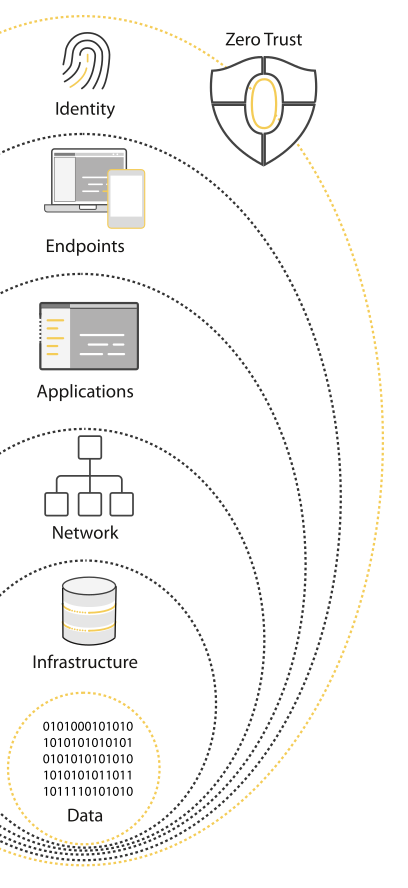
At the heart of this release is Sonador’s new resource Access Control (ACL) framework. It integrates a comprehensive set of permissions to deliver fine-grained, rule-based access to every study, series, API endpoint, and file in the platform based on Zero-Trust Principles.
Every aspect of the interface is integrated with the access control system to ensure that users can only access data and operations for which they have authorization.
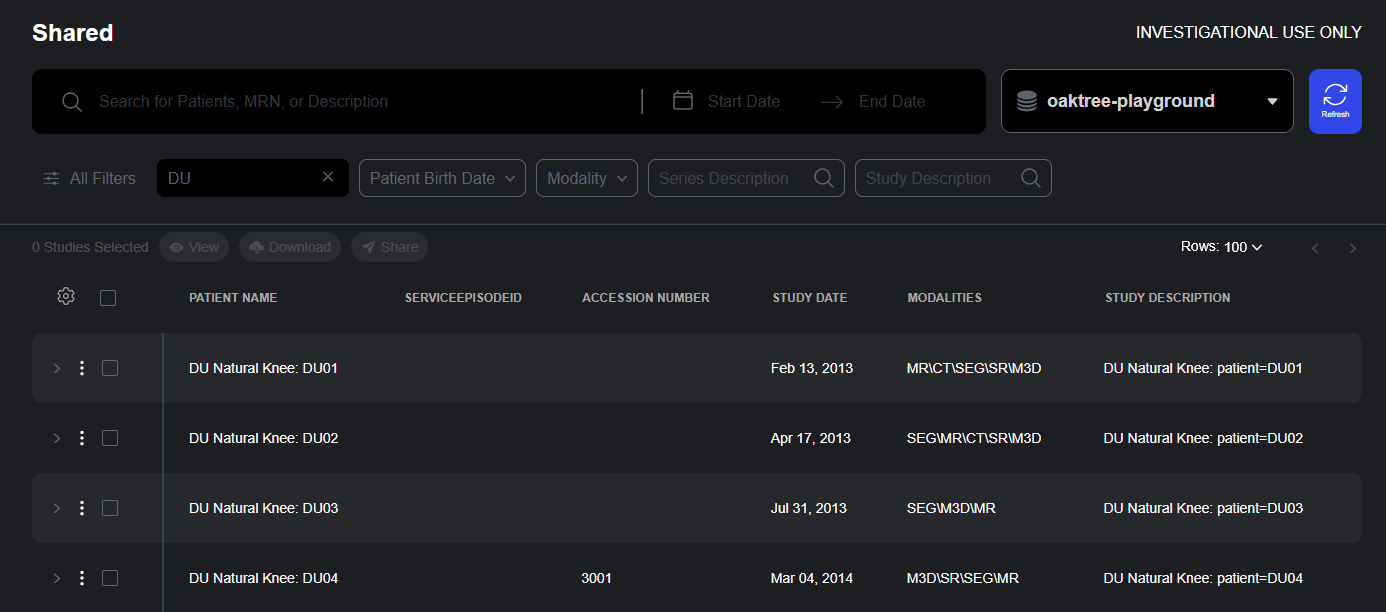
Shared Studies
The Shared Studies interface provides access to studies for which the user is authorized.
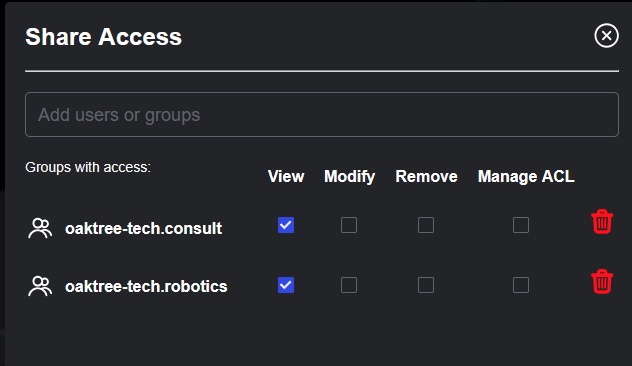
Share Access Dialog
Permissions can be managed from the Studylist user interface or via API.
Access Control and Resource Sharing
Sharing medical imaging data within or between healthcare organizations is often complex, balancing the need for collaboration with strict privacy requirements. Sonador 0.4 simplifies this process through fine-grained access controls and a new Sharing API, which includes a Shared page, where users can view all studies available through direct or group-based sharing policies. From the Share Access dialog, authorized users can define precise permissions—ensuring secure, policy-driven collaboration across teams and institutions.
- Secure External Collaboration: Sharing allows users to securely distribute studies with providers on other teams, referring physicians, or external collaborators.
- Granular Access Control: When sharing studies, users can specify exact permissions, maintaining control over sensitive medical data while enabling necessary collaboration beyond organizational boundaries.
- The Shared page provides access to the Sonador studylist along with all of its advanced search and query capabilities.
Studies can be shared by clicking on the "Share" action, which opens the Access dialog, where policies can be created or updated.
Moving from Innovation to Implementation
Sonador 0.4 delivers meaningful advances across every layer of the platform—from smarter study management to secure collaboration and precise access control. Whether you’re exploring how permissions shape workflows, configuring server roles, or integrating Sonador into your clinical environment, each new feature was built to make complex imaging tasks simpler, safer, and faster.
Use the resources below to dive deeper into the release, learn how to get started, or explore how Sonador supports your data, security, and collaboration needs.




Comments
Loading
No results found