Sonador Data Services: Governed Data Access for Connected Applications
Every application bolted onto a medical imaging platform shows up the same way: useful, urgent, and carrying its own login page. The orchestration tool keeps its own accounts and passwords. The experiment tracker keeps another set. The internal dashboard keeps a third. Each one is a separate place to manage credentials, a separate list to work through when someone leaves, and a separate system to walk a compliance reviewer through.
Security teams have a name for this -- shadow identity -- and it means that accounts and access live outside of where those responsible for ensuring that data remains secure can see them. Once shadow identity takes root, accounts outlive their owners (nobody remembers every system a departing employee could still enter), and permissions drift because every tool answers the access question its own way. The core platform stays well governed while the tools around it barely are.
Zero trust is the security model Sonador applies to this problem, and the core idea is plain: never trust a request because of where it comes from. Verify every actor, every time. (If the model is new to you, Why Zero-Trust Security is Essential is a short read that covers the background.) Under that rule, a connected application is not a special case. It is one more identity to verify, and one more doorway where a person's identity has to mean the same thing it means everywhere else on the platform.
Sonador 0.4.1 introduces Data Services to close that gap. This article walks through:
- What Data Services are, and the registration model that makes an integration reviewable
- The sign-in and authorization flow, step by step
- Registering an application: the Data Service Record and its OpenID Client
- Protecting interfaces and APIs with the Sonador FastAPI package
- A hands-on walkthrough: connecting Airflow, verifying the deny path, and protecting a custom endpoint
This piece is part of Sonador's ongoing security series. Managing Users and Access in Sonador introduced the identity layer: OpenID Connect sign-in, external identity providers, and the local user and group records Sonador resolves every login to. Resource Access Control (ACL) in Sonador covered the authorization engine: the policies and roles that decide, request by request, who may see and change imaging data. Data Services extend that same machinery across the application boundary: the users, groups, and policies those articles established now decide who gets into every connected application, too.
Autosegmentation Research Pipeline, End to End
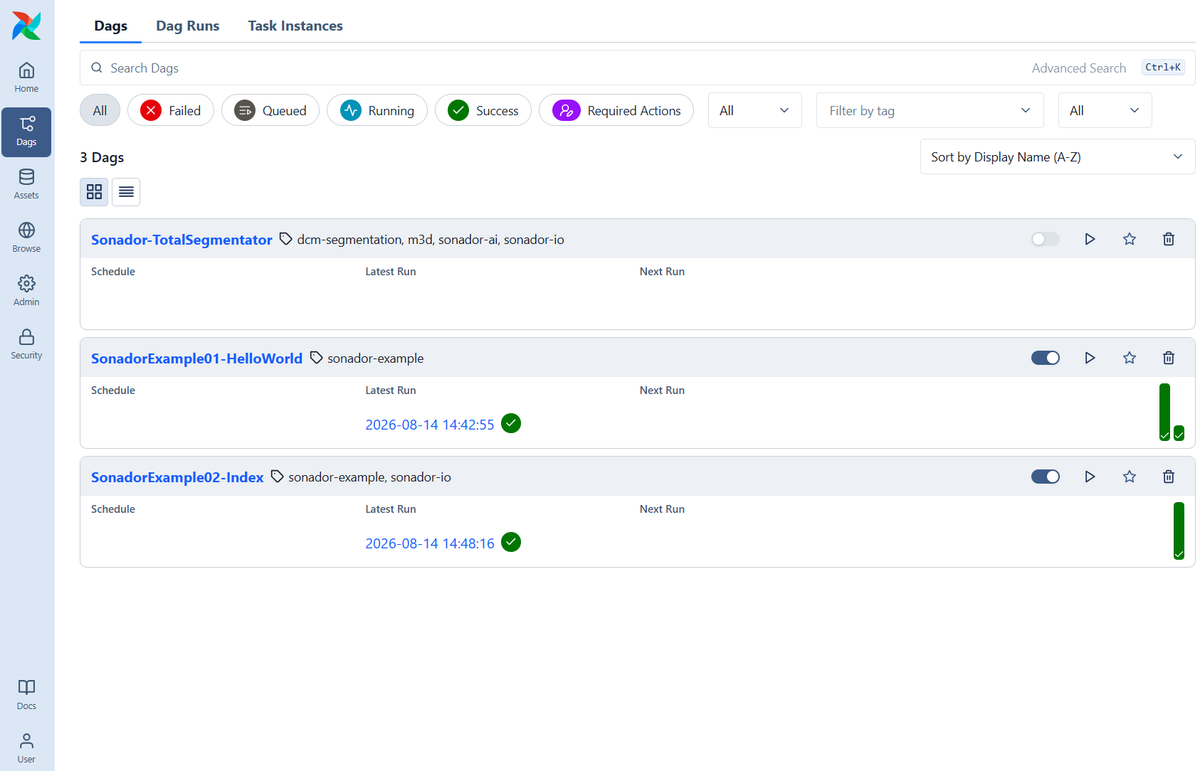
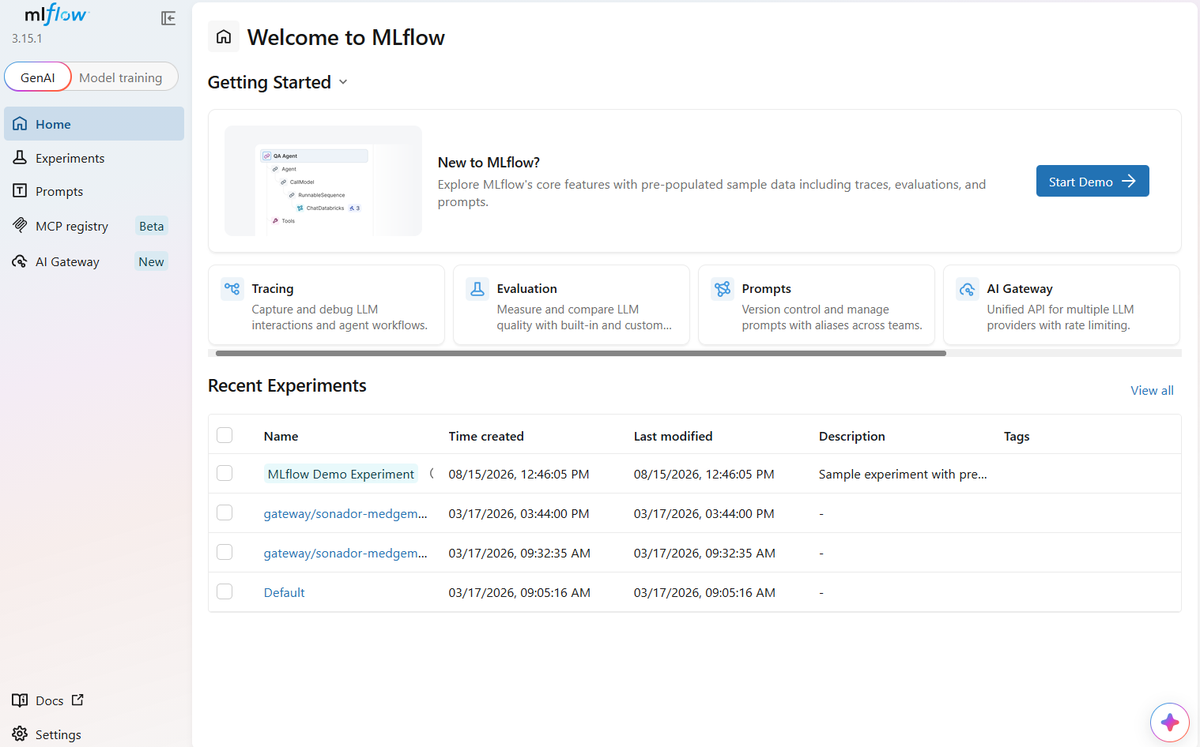
To understand the role of Data Services, it may help to consider how these features facilitate one of the workflows they were built for. An imaging research group runs a segmentation pipeline: an Airflow DAG watches for newly arrived studies and kicks off segmentation jobs as they land. MLflow tracks the experiments those jobs produce (model versions, parameters, metrics). Sentido, Sonador's connected-devices platform, streams sensor data from clinical hardware into the same environment. And a small custom FastAPI service surfaces finished results to the clinicians who asked for them.

Step 1: imaging arrives. A modality or upload-enabled system sends a new study to the imaging server. The sender presents its server credential, Sonador verifies the service-to-service identity, and the upload proceeds under the sender's server permissions (the same checks and scrutiny a person would face).
Step 2: the arrival triggers a Kafka event. The new study is published to the platform's streaming backbone, where an append-only log records that it exists.
Step 3: Airflow queues for autosegmentation. The research group's autosegmentation directed acylic graph (DAG) is subscribed to Kafka. When the imaging arrives, Airflow attempts to retrieve data using an API credential. When the request for the data arrives, the API token is checked against the Data Service policy to ensure that the system is authorized to request data. If the credential has been revoked, or the service deactivated, the pipeline does not execute.
Step 4: Data moves under policy. With entry granted, the DAG retrieves the study through ACL-checked APIs and access to the data is logged.
Step 5: Segmentation runs, and results return. The segmentation model does its work and writes the output, a DICOM-SEG (or M3D) series is attached to the originating study, back through the same credential-resolved APIs. The segmentation model was retrieved from MLflow, following a similar process. If the run is part of an autosegmentation experiment, MLflow records the run and logs the model version, parameters, and other metrics. The experiment history and the imaging data now live under one identity model instead of two.
Step 6: People re-enter the loop. A data scientist opens MLflow to compare runs; a clinician opens the dashboard to see the finished segmentation. Both sign in through their applications' Data Services (an interactive OpenID Connect session, group-checked at the door) and both see results scoped by the same ACL policies that governed the pipeline itself.
Four applications, four different jobs. Historically, that also meant four separate answers to the question of who may enter. With Data Services there is one answer. Each application is registered with the platform, and each registration names the Sonador groups whose members may sign in. No second password, no parallel account, no request to IT for one more login. The user's group memberships decide whether they may enter the application at all; once inside, the Resource ACL policies from earlier in this series decide which studies and objects they may retrieve.
The payoff is plain. The radiology resident with no business in research infrastructure never gets past Airflow's front door. The data scientist who belongs there sees only what their groups permit. And when either of them leaves the organization, deactivating one identity closes every one of these doors at once. No forgotten account sits waiting in a tool nobody audits.
Data Services (Defined)
A Data Service is how Sonador registers a connected application, and it is built from two records. The first is the Data Service Record: the application's name, its active state, and the Sonador groups and privileged roles whose members are allowed to enter. The second is its OpenID Client: the approved callback URLs the application may return users to, the authorization server it authenticates against, and the client ID that identifies it during the OpenID Connect exchange.

Together, the two records register a trusted application, its approved return locations, and who may enter. The application reuses Sonador's identity and credential-validation tools while keeping its own session and business logic. When using a Data Service, the sign-in relationship stops being an implicit arrangement buried in configuration files: it becomes a record an administrator can read, review, and revoke. If a service appears in the registry, the organization decided it belongs there and decided who may use it.
The approved return locations do more security work than it might seem. At the end of an OpenID Connect sign-in, the platform redirects the authenticated user back to the application. If an attacker could influence that return location, a forged link could route a legitimate sign-in (and the tokens that come with it) to a destination the organization never approved. So Sonador only returns users to callback URLs explicitly whitelisted on the OpenID Client. A registration spells out who may enter and exactly where the door leads.
In practice, a Data Service registration enables:
- A shared user and group model across the platform and its connected applications
- OpenID Connect single sign-on with hospital credentials
- Explicit service policy and application traceability (every integration is a named, reviewable record)
- Reusable protection for interfaces and APIs, through the Sonador FastAPI package
- Application-owned sessions and business logic (connected systems remain independent)
Sign-In and Authorization Flow
Data Services use a standard OpenID Connect authentication flow, with Sonador standing between the application and the identity provider and applying the Data Service policy as part of the hand-off with the application. A login passes through five steps:
- Open application. A user navigates to a connected application such as MLflow, which launches the authentication workflow.
- OIDC hand-off. The application redirects the user to its registered Data Service. The callback it asks to return to must match one of the approved return locations on the OpenID Client; anything else is refused.
- Identity resolution. Sonador authenticates the user through the identity provider and resolves the result to the local user record and its group memberships (the same records that govern the rest of the platform).
- Entry decision. The Data Service policy is evaluated: is this user, or one of their groups, allowed to enter this application? A user outside the entry groups stops here.
- Session established. Sonador returns the user to the approved callback, and the application creates its own session on its own terms.

The flow begins in the application's hands, passes through a Sonador-owned middle (hand-off, identity resolution, entry decision), and ends back in the application's hands. That last stretch is a deliberate piece of the architecture: once the entry decision is made, Sonador steps out of the request path. Connected applications remain independent systems with their own sessions, their own state, and their own business logic. Sonador does not proxy their traffic, sit in front of their pages, or become something every click inside them depends on.
Entry is only the first of two decisions. When a connected application turns around and asks the platform for imaging data, that request is governed by the Resource ACL policies described in the previous article in this series. Signing into Airflow proves who you are and that you belong in Airflow; it grants no imaging data whatsoever. What a pipeline may read or write is decided per request, by policy, exactly as it is for a user in the Sonador viewer.
Protecting Interfaces and APIs
Single sign-on covers people in browsers, but API calls within the autosegmentation pipeline are made by things that are not people: notebooks holding bearer tokens, scheduled jobs presenting standing API credentials, trusted services making back-end calls. A governed front door has to work for all of them, and it has to work the same way. When every credential type gets its own bespoke check, the gaps between those checks become the attack surface.
This is the job of the Sonador FastAPI package, which can be used to provide Data Service mediated integration with the Sonador Data Platform. Whatever credential arrives with a request, the package resolves it to the same platform identity and runs the same policy check before endpoint logic executes. If a caller cannot be resolved and authorized, the request never reaches your code at all. Four credential types are resolved through that single gate.

Sonador Data Services provide a uniform way to handle four different types of credentials. Every path lands on the same identity, the same groups, and the same policy evaluation, which means a security review of one endpoint is a review of the whole pattern (not of four separate authentication schemes).
Sonador's platform for wearable electronics and medical IoT, Sentido, shows how this works in practice. A connected FastAPI application that mediates both its sign-in and endpoint protection work via a Data Service. Its web dashboard authenticates users with the interactive flow described above, and its device APIs resolve tokens and credentials through the same package. One registration covers both.
Connecting Airflow
In the rest of this article, we will demonstrate how to register Airflow as a Data Service, testing the round trip, proving the deny path, and protecting a custom endpoint. MLflow (and any other application that speaks OpenID Connect) follows the same pattern with different values.
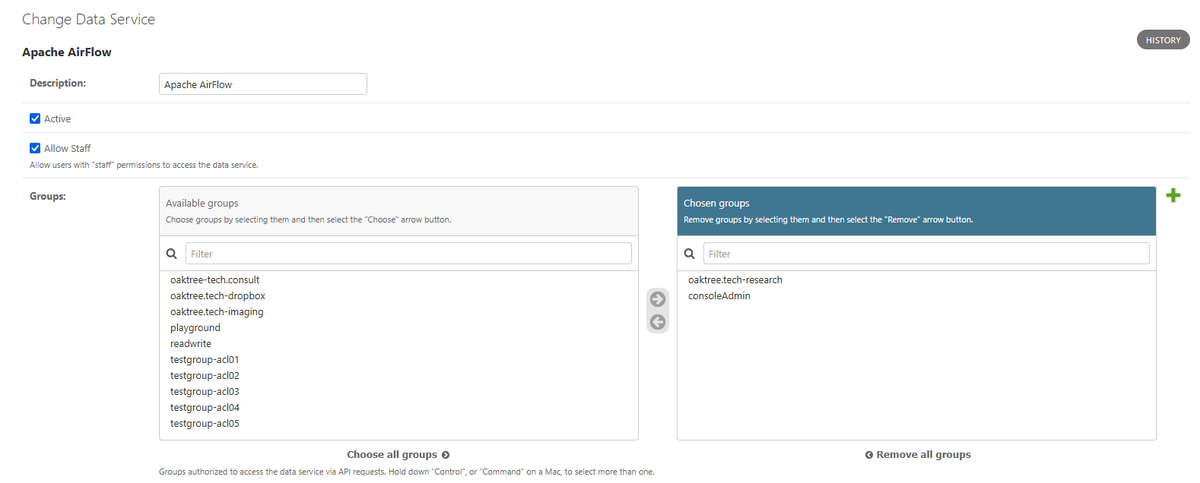
Step 1: Create the Data Service Record and assign entry groups
In the Sonador administrative interface, create a new Data Service for Airflow. Give it a name that will still make sense in a review two years from now, leave it active, and assign the groups whose members may enter (here, the oaktree.tech-research group).
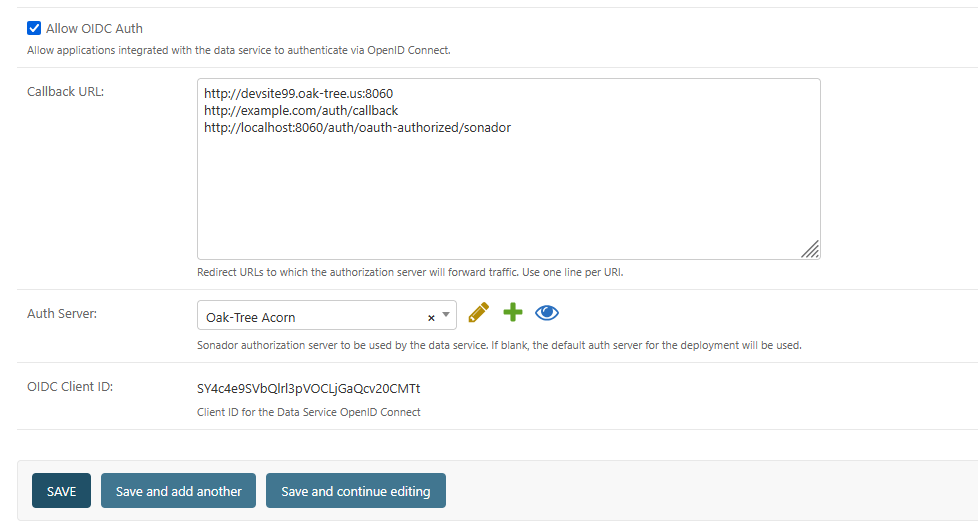
Step 2: Configure the OpenID Client
Attach the OpenID Client that Airflow will authenticate through: the authorization server, the client ID, and, most importantly, the whitelisted callback URLs. List the exact return locations Airflow uses and nothing broader. This whitelist is the guard against redirect hijacking discussed above, so resist the temptation to add a convenient wildcard while testing.
Step 3: Connect Airflow and test the sign-in round trip
Point Airflow's OpenID Connect configuration at the Data Service (authorization server, client ID, callback) and sign in as a member of an entry group. You should travel the full loop: Airflow's sign-in button, the Sonador-owned authentication and entry decision, and a return to Airflow with a working application session under your platform identity.
Step 4: Verify the DENY path
Now sign in as a user who is not in any entry group. Authentication succeeds (this person is who they claim to be), but the entry decision turns them away with a 403 instead of an Airflow session. Do not skip this test. You want proof that the door stays closed to the wrong people, and this denial is also the first record an auditor will ask you about.
Step 5: Protect a custom FastAPI endpoint
For the results service (or any in-house application), the Sonador FastAPI package applies the same protection as a route dependency. The handler below never executes for a caller whose credential cannot be resolved and authorized.
The example in the listing is taken from ContextDB, a PgVector based API used within Sonador AI to store model embeddings. ContextDB demonstrates the use of the Sonador FastAPI package. The helper methods in this example retrieve the Sonador connection URL, "application" API token, and data service ID from environment variables. Refer to the FastAPI README for parameter names and documentation.# Import FastAPI and SessionMiddleware dependencies from fastapi import Depends, FastAPI from starlette.middleware.sessions import SessionMiddleware # Import helper methods to verify Sonador credentials and initialize Oauth Client from sonador_fastapi import validate as sonador_fastapi_validate from sonador_fastapi import oauth as sonador_oauth # Application Name APP_NAME = 'Example App' APP_VERSION = '0.1' # Load Sonador connection variables from environment and validate FastAPI <-> Sonador integration. # If there is an issue with the environment configuration, the helper method will throw an error. ISERVER, SONADOR_DATASERVICE = sonador_fastapi_validate \ .validate_sonadorenv_connection_params(APP_NAME) FASTAPI_CONF = sonador_fastapi_validate.validate_fastapi_integration_params( APP_NAME, ISERVER, SONADOR_DATASERVICE) # Initialize FastAPI app. The Docs and Redoc URL are deliberately left null # so that protected versions can be initialized. app = FastAPI(title=APP_NAME, version=APP_VERSION, docs_url=None, redoc_url=None) # Add session middleware app.add_middleware(SessionMiddleware, secret_key=FASTAPI_CONF.FASTAPI_APP_ENCRYPTION_SECRET, same_site=FASTAPI_CONF.FASTAPI_SAME_SITE, https_only=FASTAPI_CONF.FASTAPI_HTTPS_ONLY) # Initialize OpenID Connect workflow endpoints: adds OpenId Connect authentication sonador_oidc_client = sonador_oauth.SonadorFastAPIOidcClient( SONADOR_DATASERVICE, FASTAPI_CONF.FASTAPI_APP_ENCRYPTION_SECRET) sonador_oauth.init_oidc_endpoints(app, sonador_oidc_client) @app.get("/api/v1/results/{study_id}") def read_results(study_id: str, user = Depends(sonador_oidc_client.ui_authtoken_check)): # Reached only after the caller's credential (session, bearer token, # API credential, or server credential) has been resolved to a # platform identity and checked against the Data Service policy. return results_for(study_id, requested_by=user)
That is the whole integration: one dependency on the route, one registration in the platform. Your endpoint code stays focused on its actual job.
Recommended Practices
Data Services are opinionated about how they provide access to Sonador services.
- Whitelist callbacks explicitly. All application redirects must be explicitly added to a Data Service, it is not possible to use wildcard grants.
- Policies are applied via group settings. Group-scoped policies follow people through role changes and offboarding (per-user grants become the stale exceptions nobody remembers approving, which is why all Data Service access is granted via group scoping).
- Pair entry with the blank-policy baseline. The ACL article in this series recommends starting resources with a blank policy (nothing accessible until deliberately granted). Keep that baseline when you add Data Services, so entering an application never implies access to any data.
- Treat each registration as a record worth reviewing. Name services so a future reviewer understands them without digging, and when an integration is retired, deactivate the record instead of deleting it. The history of what was trusted, and when, is part of your security story.
IMPORTANT: Entry authorizes the application; ACLs authorize the data. These are deliberately separate decisions, made by separate policies, and no configuration should ever collapse them into one.
Conclusion
The zero-trust posture Sonador built inward (verified identity, per-request authorization) now extends outward. Airflow, MLflow, Sentido, and the tools your team builds next can share the platform's users, groups, and policies through one registration apiece: no new login system to operate, no second set of accounts to reconcile, no separate audit silo to explain to a reviewer. The trust relationships that used to live in scattered configuration are now records you can read.
Documentation
- Managing Users and Access in Sonador: the identity foundation of the series, covering OpenID Connect sign-in and external identity providers.
- Resource Access Control (ACL) in Sonador: the authorization engine whose policies govern every data request made after entry.
- Sonador 0.4.1 Release Announcement: the full release picture, from advanced 3D imaging to resilient review and operational trust.
- Sonador Authentication Credentials: developer reference for the credential types resolved by the FastAPI package.
- Resource Authorization: developer reference for policy evaluation and the authorization API.
- Why Zero-Trust Security is Essential: the security model this series applies to medical imaging.
- Sonador Quick Start: stand up a development environment to follow the walkthrough hands-on.